Plumerai AI Captions
Plumerai AI Captions turns every video event into a short text description of what happened, more accurately and at a much lower cloud compute cost than general-purpose cloud AI services. Instead of a generic "Person detected" notification, a homeowner reads "A FedEx delivery person placed a package by the front door." and a warehouse manager reads "A person opened a garage door, a forklift drove out, and the person closed the door." Both understand the event without watching the video.
Plumerai AI Captions is built on our captioning VLM, a Vision Language Model that we specifically optimized for security and smart home camera footage. We've validated it extensively on real-world video footage from security cameras and video doorbells. Before the captioning VLM sees a video, Plumerai Video Intelligence runs it through Advanced Motion Detection, People, Vehicle, Animal & Package Detection, and Multi-Camera Re-Identification, adds names from Familiar Face Identification, and picks out the most informative frames and image regions. This combination delivers accurate captions at a fraction of the cloud compute cost of sending video to general-purpose cloud VLM APIs.
Product features:
- Optimized for security camera footage: captions focus on people and what they're doing, and mention vehicles, animals, and packages when they're part of the event.
- Combines Plumerai's efficient AI models with the captioning VLM, resulting in high accuracy and large cloud compute cost reductions compared to general-purpose cloud VLM APIs.
- Deploys in your own cloud account. Video stays within your infrastructure, and there are no per-request API fees.
- Predictable costs: you run the model on your own instances, so there are no unexpected price changes or model deprecations from a third-party API provider.
Use cases
Smart home cameras and video doorbells
- Descriptive notifications. A push notification describes what actually happened, not only that a person or vehicle was detected, so users know whether they need to look.
- Video history at a glance. Each clip in the event timeline gets a one-line description, so users can scan a full day of events without playing every video.
- Fewer pointless notifications. When nothing relevant happened in a clip, for example only a lighting change or moving foliage, AI Captions reports "No activity detected", so you can suppress the notification.
- Search by text. Captions can be stored with each video's Plumerai AI Video Search data, so users can find events by typing what they're looking for, including the event behind a notification they just received.
Commercial security
- A readable event history for busy sites. A shop, office, or warehouse can generate hundreds of events per day, far too many for push notifications. Captions turn the event log into something an owner or operator can read, so they see at a glance what happened while they were away.
- Faster review and investigations. Operators scan text descriptions instead of scrubbing through clips, then use AI Video Search to find specific moments and the forensic search of Multi-Camera ReID to follow one person across cameras.
- Input for your own workflows. Because captions describe events, not just objects, the caption text can feed rules or downstream systems that decide which events need attention.
How AI Captions works
AI Captions processes each video in two stages. Video processing runs on the camera or on CPU instances in the cloud. Caption generation runs on GPU instances in the cloud. The diagram below shows the components.
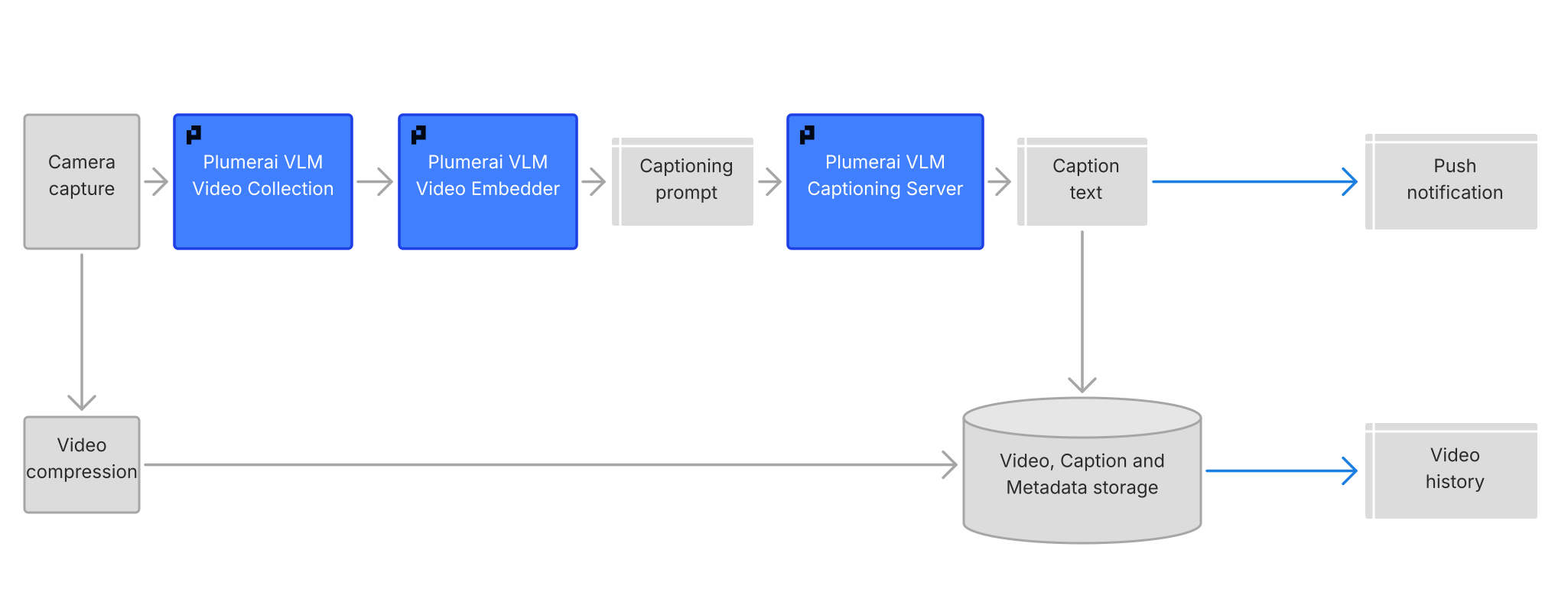
- The Plumerai VLM Video Collection runs the video through Plumerai Video Intelligence, including Advanced Motion Detection, People, Vehicle, Animal & Package Detection, and Multi-Camera ReID. It tracks the objects in the clip and selects the most informative frames and image regions. We optimized this selection with reinforcement learning, so that the captioning VLM sees exactly what it needs for an accurate caption.
- The Plumerai VLM Video Embedder turns the selected frames into compact embeddings. This is the same image embedder that powers AI Video Search, so deployments that use both features compute these embeddings only once.
- The results are combined into a captioning prompt that's customized and optimized for each video clip. It's built from the results of steps 1 and 2, together with metadata such as the names of people recognized by Familiar Face Identification and the type of camera. The prompt is far smaller than the video clip itself. Steps 1 to 3 run as a single call to the Plumerai library.
- The Plumerai VLM Captioning Server runs our captioning VLM on a cloud GPU. It receives a captioning prompt and returns the caption text. It's delivered as a ready-to-run server that's tuned for the GPU type it runs on.
The extra context that goes into the prompt makes captions more useful:
- Names. When a single person in the clip is recognized by Familiar Face Identification, the caption can use their name, for example "Alice played with a ball."
- Camera type. Knowing that a clip comes from, for example, a video doorbell helps the captioning VLM understand interactions with the device itself, such as a person pressing the doorbell button.
- Arrivals and departures. A scene layout of the camera's view helps the captioning VLM tell more accurately whether a person or vehicle arrived at or left the house.
Scene layout
Scene layout is a separate AI component that describes the static parts of a camera's view: where the doors, driveways, and other boundaries are. The captioning VLM can tell from the video alone whether a person entered the house or a car left the garage. AI Captions can optionally use the scene layout to make this more accurate and efficient, because it then knows where the boundaries are instead of having to work them out from each clip.
- Set up automatically. For a newly installed camera, the scene layout is computed from its first videos, and it stays valid until the camera's view changes. When a video shows a different view than the scene layout, for example after the camera was moved, AI Captions flags it so the scene layout can be updated.
- Doors out of view. The scene layout also covers doors next to the camera that it can't see, such as the front door next to a video doorbell.
- One event per person. Arrivals and departures are judged over the whole clip, so a person who steps outside and comes straight back in doesn't count as leaving. With Multi-Camera ReID, the tracks of the same person are combined into a single event.
- Available as events. Besides improving captions, arrivals and departures are also returned as separate events that you can use in your own app logic.
Why cloud compute costs stay low
Low cloud compute costs come from combining Plumerai's efficient AI models with a captioning VLM that's built for security camera footage:
- Our own model, built for security and smart home camera footage. Unlike general-purpose VLMs, the captioning VLM doesn't need to handle the many tasks unrelated to camera footage, which keeps it efficient to run.
- The captioning VLM only sees what matters. Instead of processing every frame of a clip, it receives a small set of selected frames and regions, together with metadata from Plumerai's efficient AI models. This greatly reduces the GPU work per caption.
- Optimal compute instance selection. We help you choose the instance types and settings that give the right balance between caption latency and cost per caption for your product.
Deployment scenarios
The Plumerai VLM Captioning Server runs in the cloud on a GPU. Video processing runs on the camera or on CPU instances in the cloud.
All components are deployed in your own cloud account, typically on AWS, Azure, or Google Cloud, so video and captions stay within your infrastructure. We recommend the instance types to use and support your team during deployment. Scaling across machines is handled by your own infrastructure, for example with Kubernetes, while the Plumerai software handles request queuing on each machine. The captioning server provides a health check, structured logs, and OpenTelemetry traces, so it fits into your existing monitoring.
Videos can be provided in two ways:
- Complete clips. Each recorded clip is passed in as a video file once it's finished. This is the simplest integration.
- Frames as they arrive. Decoded frames are passed in while the clip is still being recorded, for example from an RTSP stream. Video processing keeps up with real time, so the caption can be requested as soon as the clip ends, without extra processing delay.
Technical documentation
The AI Captions API isn't public yet, but we can make it available upon request. Contact us at [email protected].