Plumerai VLM Video API
This page documents the API for the VLM Video Collection and VLM Video Embedder components.
These components are used in Plumerai Video Search and Plumerai Real-time Alerts. See those product pages for an overview of how these components are used in practice.
For context, the architecture diagram from the Video Search product page is included below:
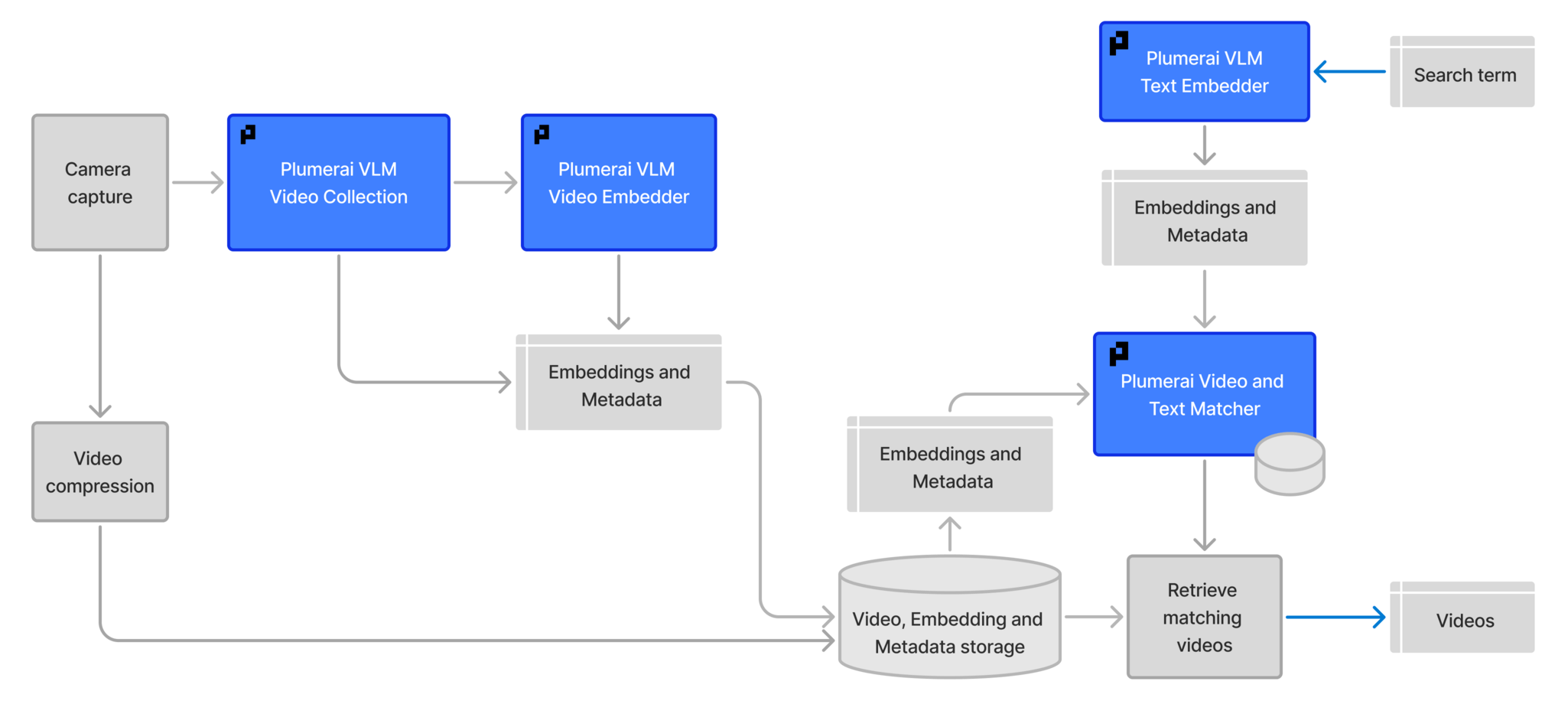
For the VLM Text Embedder and the Video and Text Matcher API documentation, visit this page.
See the minimal examples for example usage of the VLM Video Collection and VLM Video Embedder API.
VLMVideoCollection
start_clip
VLMVideoCollection.start_clip(
    include_thumbnails: bool = False, include_captioning_data: bool = False
) -> ErrorCode
Start a new clip to collect data for the VLM Video Collection.
The user needs to decide when data collection should start, e.g. when someone walks into view. The VLMVideoCollection then will start collecting the necessary data for the VLM from this point onwards for every call to process_frame, until end_clip is called.
The results will be available when calling end_clip.
If include_thumbnails is True, the collected data can be used for thumbnail generation. If include_captioning_data is True, the result can be used for caption generation. If the only purpose of the data is to do video search with the VLM Video Embedder, then both can be set to false to keep the data size smaller. Accuracy of video search is not affected by this parameter.
This is the clip-based version of video search. As an alternative, a clip-less version is available via set_collection_ready_callback, see docs for that function for more details.
Arguments:
- include_thumbnails: If True, include data required for thumbnails.
- include_captioning_data: If True, include data required for video captioning.
Returns:
- Returns
SUCCESSon success, orCLIP_ALREADY_STARTEDwhen a clip was already started.
end_clip
Ends the data collection for the clip started with start_clip.
In addition to the resulting 'clip data' bytes, this method also returns a list of selected frames which can be used for thumbnail generation or other purposes. Each frame is represented as a tuple of a timestamp (in seconds) and the input image that was originally passed to process_frame (typically a numpy array).
Arguments:
- None.
Returns:
- Returns a tuple with an error code, the result data and a list of selected frames. The error code is
SUCCESSon success orCLIP_NOT_YET_STARTEDwhen a clip was not started previously or was already ended before.
set_collection_ready_callback
Register a callback invoked synchronously from process_frame whenever a new collection is ready.
This is the clip-less version of video search, as an alternative to the clip-based version using the start_clip/end_clip API. A callback is registered that automatically triggers whenever data for video search is ready to be collected. This is driven by internal Plumerai logic rather than a user-defined time interval. In case of clear clip boundaries (e.g. triggered by PIR waking up the camera) it is recommended to use the start_clip/end_clip API instead. In case of cameras that run 24/7 with no clear clip boundaries, this API is recommended.
The user must call finish_all_collections at end-of-video to flush still-active collections.
The callback is invoked on the calling thread of process_frame (and of finish_all_collections) and may fire zero, one, or multiple times within a single call.
Arguments:
- callback: A function called with the serialized collection data (bytes).
Returns:
- Returns
SUCCESSwhen the callback is registered, orNOT_AVAILABLEwhen VLM video collection is not available.
Example: pvi = pvi_api.VideoIntelligence(height, width) collections: list[bytes] = []
def on_collection_ready(data: bytes) -> None:
    collections.append(data)

status = pvi.vlm_video_collection.set_collection_ready_callback(
    on_collection_ready
)
if status != pvi_api.ErrorCode.SUCCESS:
    ...
for frame, dt in ...:  # video frames loop
    pvi.process_frame(frame, dt)  # callback may fire 0+ times per call
pvi.vlm_video_collection.finish_all_collections()  # drain pending tracks
finish_all_collections
At the end of a video sequence, call this to flush collections. Only to be used in conjunction with set_collection_ready_callback.
Arguments:
- None.
Returns:
- Returns
SUCCESSwhen everything was successful, orNOT_AVAILABLEwhen VLM video collection is not available.
VLMVideoEmbedder
compute_embeddings
VLMVideoEmbedder.compute_embeddings(
    clip_data: bytes, compute_single_unit_only: bool = False
) -> tuple[ErrorCode, bytes]
Compute video embeddings on data collected using `VLMVideoCollection.
Depending on the size of the collected data, this can be compute-heavy. The user can optionally set compute_single_unit_only to compute only a single part of the video embeddings. When compute_single_unit_only is set, this needs to be called in a loop with the same arguments. The error code return value will inform the user whether all units were computed, and whether the results are valid.
Arguments:
- clip_data: The data collected using
VLMVideoCollection::start_clipandVLMVideoCollection::end_clip. - compute_single_unit_only: Can be set to do a partial computation of the embeddings. If set, this needs to be called in a loop, see above.
Returns:
- A tuple with the resulting embeddings and an error code. Returns
SUCCESSwhen all embeddings have been computed,EMBEDDING_PART_COMPUTEDwhen a single unit was successfully computed (but not everything), orINVALID_CLIP_DATAwhen the clip data is invalid. The resulting embeddings are only valid when the error code isSUCCESS.